

Comet or Shooting Star
 Description
Have you ever seen a falling star? Well even if you didnt with this tutorial you will be able to make one yourself.
Also take a look at other Photoshop tutorials...
 Learn to use Quick Mask |  Red Glass Button |  Burning text |  Pre-press tips for Photoshop users |  All About Adjustment Layers |
Pages
Making a Shooting Star:
Use small soft brush, I used size 10, hardness 0 and make a small dot, maybe 25 px in diameter fo our picture.
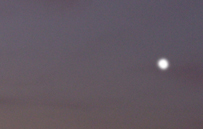
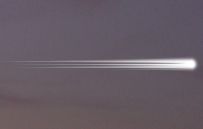
Use Filter/Blur/Gaussian blur with diameter 0.8 (for my picture it is enough) and you get this:
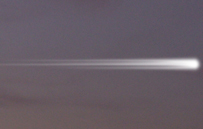
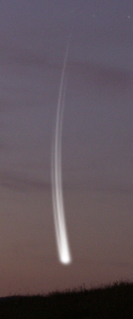
Now rotate it to vertical position by Edit/Free transfor because in this position we will apply one distortion effect.
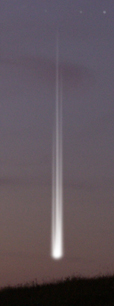
We will distort the comet a little with Filter/Distort/Shear using the settings like in the picture:
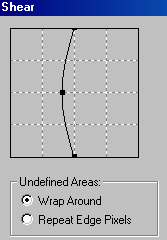
By this effect you should get something like the following:
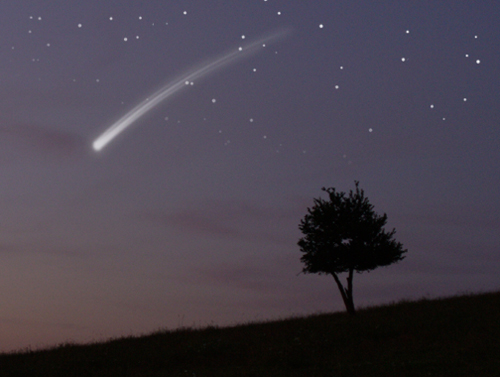
Now move the comet to its position and use Layer/Layer style/Outer Glow to adjust its surroundings. Also decrease the opacity of the effect as well as of the comet itself.
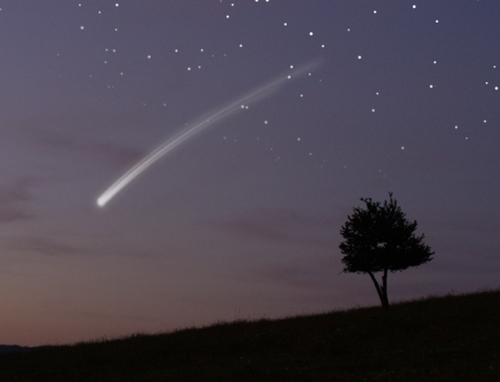
You can also use Edit/Free transform to edit the shape even more, just hold Ctrl and move with the anchor points.
Hey, look! Shooting star ! Wish something !
Pages
Submitted by Martin on 2006-04-16 23:26:09. Since then read 446451 times.
Scored 4.37 points out of maximum 5 by 134 votes.
Also take a look at other Photoshop tutorials...
Red Glass Button |  Crumbled old paper texture |  Alien text |  Dewy window |  Space flight simple |
Rate this tutorial!
Invite a friend!
Discussion
ShadeX shadex DOT forums AT gmail DOT com said on 2006-04-23 10:21:46Very nice tutorial! Good job
Elena mystra307 AT hotmail DOT com said on 2006-05-25 23:26:46
Fantastic. A very good idea to get beauty "summer" night pictures
Martin mato AT t-tutorials DOT com said on 2006-05-26 11:31:18
I am glad you liked it. It was not that hard to make from the technical point of view, but the problem was that I have not seen the shooting star for longer than 2 nanoseconds :) Good idea, I am so proud of myself :D thx
Du hikaruutadu AT yahoo DOT com said on 2006-06-05 19:37:06
XD god, i never know make a starry night could be this easy.
Astronomer salesblue AT hotmail DOT com said on 2006-06-22 11:28:06
Very nice tutorial, but as an amateur-astronomer I can say that the stars as well as the comet look lousy, sorry.
Dan chronosoldier21 AT gmail DOT com said on 2006-07-16 14:53:59
i would like permission to use your nightsky image for photoshop, and also to post on DeviantART. Base Image credits will be given. Email me for the answer Thanks, Dan
Tyler Tjay0609 AT yahoo DOT com said on 2008-04-30 10:52:13
Thanks so much. It's 1 in the morning of my girlfriend's birthday and i needed a picture to put on the front of the jewel case. i won't go into detail, but you saved me here. Thanks big time
Holly hollychemical AT live DOT co DOT uk said on 2008-11-21 11:01:45
Ah, thank you! It's a simple yet very effective tutorial. :]
aliiisaaa naymakoyer AT hotmail DOT com said on 2008-11-21 11:37:58
shooting stars arr thaa mst ugliestt fingz ii ave eva seen nd ur syd ittt bun
Patricia said on 2009-01-26 23:56:31
(: Wow so easy to follow. Good job. Instead of using the 'Outer Glow' effect. I duplicated the layer, and did a Gaussian Blur (4.7px) Does the same thing. : P But if you do both outer glow & GB, it makes a bigger shine. Hehe, I'll stop wasting your life. Anyways. Nice tutorial.
JBL said on 2009-02-01 03:53:09
Thank you, I needed such a tutorial!
Julie milletresors AT orange DOT fr said on 2009-05-29 09:53:17
Beautiful ! I'm looking for an illustration about shooting stars for a children's paper magazine (humble... 1000 readers) edited by a family association. May I use your picture ? I'll quote your credit and will give you more information if needed. Thank you ! Julie
Cindy cindy177 AT charter DOT net said on 2011-02-05 00:49:30
Thanks very much - this was incredibly helpful!
Anonymous said on 2011-02-25 23:51:05
that doesnt even look real
Anonymous said on 2011-02-25 23:51:06
that doesnt even look real
Becca said on 2011-02-25 23:58:14
wpw ur tutorial suck a LOT!!!! like that really doesnt look like a shooting star.... you suck, seriously...
Becca T said on 2011-02-26 00:00:05
oops, im sorry. i meant to say that this SUCKS A LOT!!! REALLY SUCKS
Becca T said on 2011-02-26 00:00:05
oops, im sorry. i meant to say that this SUCKS A LOT!!! REALLY SUCKS
nikezoom nikezoom AT gmail DOT com said on 2011-05-07 09:33:40
This article is very good, I like it very much, and I also like Nike outlet sports series, hope we can share the fun of Nike zoom.thank you.
rawr said on 2012-04-15 08:34:06
Thanks for the tutorial, very helpful.
